



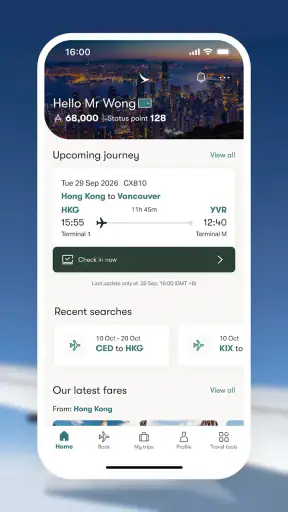

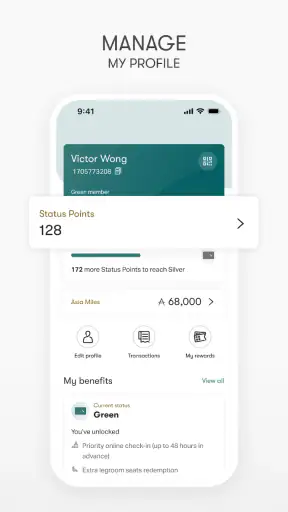
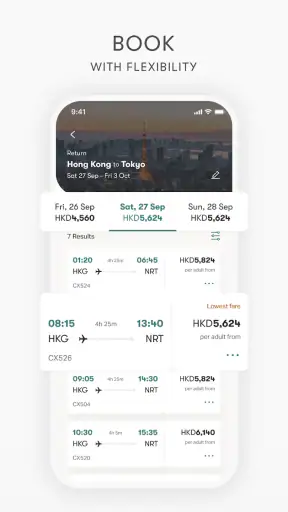
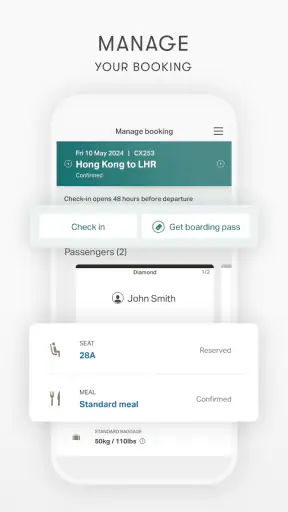
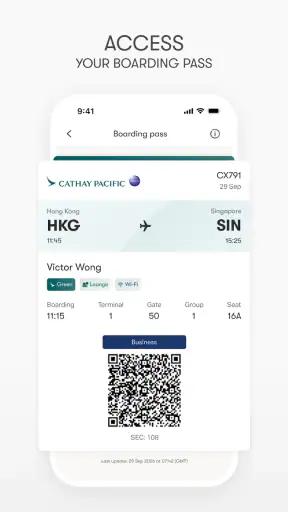
When I use the Cathay Pacific app, I think of it less as a general travel search tool and more as a single control point for a Cathay trip. Its central value is the ability to book, plan, and manage travel without constantly moving between separate airline pages, confirmation messages, and airport information screens. That sounds simple, but it matters most when a journey changes after the original booking.
This is a free Travel & Local app from Cathay Pacific Airways Ltd. It is available to everyone, has passed one million installs, and carries an average rating of 3.1 from around eleven thousand ratings. Those figures suggest a widely used app with a mixed experience rather than a universally loved one. My own view is similarly practical: it can be very useful when I am flying with Cathay and want airline-specific control, but it is not the best replacement for a broad travel comparison app.
One place to manage a Cathay journey
The capability that matters most
The strongest idea here is trip management in one place. Instead of treating booking as the end of the process, the app follows the journey through its planning and management stages. That makes it more relevant after I have already decided to fly Cathay than before I have chosen an airline.
For a traveler, this distinction is important. A general booking service may be better for comparing several airlines, checking different combinations, or looking for the lowest overall fare. Once Cathay is the airline I want, however, an airline-owned app has a more direct relationship with the reservation. I am not relying on a third-party interface to interpret airline information or send me back to the carrier for the next step.
The app is therefore most convincing as a companion to an existing Cathay booking. Its usefulness comes from reducing the number of places I need to check. I can approach the trip as one ongoing task rather than as separate jobs for buying a ticket, reviewing the itinerary, and dealing with changes.
That focus also explains its main limitation. If I am still deciding between Cathay, another full-service carrier, and a low-cost airline, this is not the first app I would open. It is designed around Cathay Pacific rather than the whole travel market. That narrowness is a weakness for comparison shopping, but a strength once my airline choice is settled.
What “manage” means in everyday use
In practical terms, I use an airline app like this when the trip is no longer an abstract search. I may need to revisit the itinerary, check the details I entered during booking, or prepare for the next stage of travel. Keeping those actions together is especially helpful when I booked several weeks earlier and no longer remember every part of the reservation.
A good workflow is to open the app soon after booking, make sure the trip appears correctly, and use it as the main place for later checks. That habit avoids the common problem of searching through an email inbox at the airport. It also gives me a clearer picture of what I am managing before I leave home.
I would not treat the app as a substitute for reading the actual conditions attached to a ticket. Airline bookings can involve fare restrictions, baggage rules, connection requirements, and other details that deserve careful attention. The app can organize the journey, but I still need to make decisions based on the reservation terms rather than assuming that a convenient mobile screen removes every restriction.
How the experience fits into a real trip
Imagine I am traveling for a short work visit. I book a Cathay flight, then open the app later that evening to review the journey while I have time to think. A few days before departure, I return to check the itinerary again instead of searching through old messages. On the travel day, I want the same place to be my starting point for managing the booking.
The benefit is not dramatic automation; it is continuity. I do not have to remember which browser tab contained the reservation or which email included the relevant details. When plans feel rushed, that small reduction in friction is valuable. For a family trip, the same approach can help me review everyone’s arrangements before leaving, although I would still check each traveler’s information carefully rather than assuming that one glance covers the whole party.
For a multi-city journey, I find the single-app approach even more useful because there are more details to keep straight. The app does not turn a complicated itinerary into a simple one, but it gives me a consistent place to revisit the Cathay portion of the journey. That is a meaningful difference from using a generic search service only at the moment of purchase.
Using it well without expecting it to do everything
A sensible booking workflow
I would begin with comparison outside the app if I am flexible about airlines, dates, or routes. Once Cathay is the clear choice, I would move into the app and keep the rest of the process there. This two-stage approach avoids forcing one tool to perform a job it was not built for.
Before confirming a booking, I would slow down and check the route, travel dates, passenger details, and fare information. Mobile interfaces are convenient, but convenience can encourage quick taps. A larger screen may be more comfortable for comparing several options side by side, while the app is better suited to maintaining the selected trip afterward.
After booking, I would reopen the journey rather than assuming the process is finished. This is one of the more useful habits with any airline application: confirming that the reservation is visible gives me an early chance to notice a typing mistake or an itinerary detail that I misunderstood. It also means I am familiar with the app before I need it in a busy airport.
Why airline-specific management can beat a general travel app
General travel apps are excellent for discovery. They can place airlines, routes, and prices next to one another, which is exactly what I want when I have not made a decision. Their weakness appears after booking, when airline-specific questions often lead me away from the third-party service and toward the carrier anyway.
Cathay’s app makes more sense at that later stage. It is not trying to be my entire travel library. It is a direct channel for a Cathay journey, so I can keep the airline’s booking and planning tasks associated with the same account and application experience. For someone who flies Cathay regularly, that consistency may be more valuable than having every airline represented in one interface.
The trade-off is that I may still need another tool for the parts of a trip outside Cathay. Hotel reservations, rail connections, independent activities, and competing flight options belong elsewhere. I would not install this expecting a complete vacation planner. I would install it because one airline is responsible for an important part of my journey and I want that part handled directly.
Three practical habits that improve the experience
First, I would use the app as a preparation checklist rather than opening it only during a crisis. Reviewing the trip while calm is more useful than discovering the interface for the first time while standing in a departure queue. This is a small change in behavior, but it turns the app from an emergency reference into a regular planning tool.
Second, I would keep the app’s role clear when arranging a group trip. The person who made the booking should not assume that every traveler knows the itinerary or that one person’s phone solves every identification issue. I would compare the app’s trip details with the names and dates in the booking confirmation, then make sure the people traveling know where their own information is kept.
Third, I would use a larger screen or a separate comparison service when the decision involves many alternatives, then return to the app once I have selected Cathay. This avoids the common mistake of judging an airline app by the standards of a metasearch engine. The two tools answer different questions: one helps me choose, while the other helps me manage the airline booking I chose.
Where the friction may appear
The average rating of 3.1 shows that the experience has not been equally smooth for everyone. I would not interpret that number as proof that the app is unusable, but I would take it as a reason to keep a backup of essential booking information. A phone application should make travel easier, yet airport connectivity, account issues, or an unexpected app problem can still create stress.
That is why I would not rely on the app as my only record. I would retain the confirmation message and any important travel documents separately. This is not a criticism unique to Cathay; it is sensible preparation for any airline app. The app is a convenient management layer, not a guarantee that every travel problem can be solved from one screen.
Another point of friction is expectation. Someone looking for a broad, highly visual travel marketplace may find the Cathay focus restrictive. Someone who wants to compare a large range of carriers may also feel that the app becomes useful only after the airline decision is made. In my experience, the more committed I am to flying Cathay, the more reasonable the app feels.
Who benefits most from it
I would recommend it first to passengers who have already chosen Cathay Pacific, especially those who prefer handling travel from a phone rather than repeatedly searching an email account. It is also a sensible fit for repeat Cathay travelers who want a familiar place for future trips instead of starting from scratch each time.
Business travelers can benefit from the focused workflow because they often care more about quickly checking and managing a known airline booking than browsing every possible carrier. Families may appreciate having the trip available in one airline-specific location, provided the booking details are reviewed carefully and not treated as automatically correct.
It is less suitable for travelers whose main priority is finding the cheapest combination across multiple airlines. I would also hesitate to recommend it as the only travel app for someone building a holiday from many unrelated providers. In those cases, a general travel platform may be the better first choice, with this app added afterward if Cathay becomes part of the plan.
Device and version considerations
The current version is 15.0.1, and the app requires iOS or Android 11 or later. That requirement is worth checking before a trip, particularly if I am using an older phone that has not been updated for some time. I would rather discover compatibility at home than during departure preparations.
Because the app is free and rated for everyone, there is little barrier to trying it before committing to regular use. The sensible test is not simply whether it opens. I would sign in or access a trip, review the journey, and see whether the main actions feel clear on my particular phone. Airline apps can feel different depending on screen size, operating system behavior, and how often I use them.
My recommendation after using it as a trip companion
The Cathay Pacific app succeeds when I judge it by its real purpose: keeping a Cathay journey organized from booking through later management. Its best feature is not a flashy extra but the way it connects the stages of one airline trip. That focus makes it more useful after I have chosen Cathay than while I am comparing the entire market.
I would use it alongside, not instead of, a broader travel search tool when I need to compare airlines or assemble a complex holiday. I would also keep booking records available outside the app and review fare details carefully. Those precautions address the main practical weaknesses without taking away the convenience of having the airline’s trip tools together.
For a Cathay passenger who wants a direct, free mobile companion, I think it is worth trying. The mixed rating means I would approach it with realistic expectations rather than assuming a flawless experience. Still, if my trip is centered on Cathay, the app can save time, reduce scattered information, and give me a more orderly way to prepare. Its real advantage is continuity: one airline journey, managed from one place.


